iOS Network Logging: On-Device Debugging Without a Proxy
Using network logging to diagnose issues during release testing.
The problem
Trainline ships features through multiple teams: web, mobile, backend, data, and more. When a request crosses several systems, diagnosing bugs often requires a tracer ID. At Trainline we call these Conversation IDs. They encode useful context about the client that sent the request.
During iOS release testing we regularly hit issues that required a Conversation ID to investigate. Without it, debugging became slow and frustrating for whoever was asked to help.
Why not just use a proxy?
Proxies are the standard way to inspect network traffic, but they are painful on physical devices:
- You need the proxy running before the bug appears, or you miss the data.
- On-device proxy tools are expensive and often require approval.
- Non-technical teammates struggle with setup: WiFi settings, certificates, VPNs.
The friction meant bugs often stalled in Slack. We needed something easier.
The solution: log on-device
Instead of relying on a proxy, we logged requests on the device and inspected them after the fact. I built a small tool called Network Logger (yes, the name is boring).
Requirements:
- Do not enable logging in production. The logs are large and contain sensitive data.
- Trainline has an internal app called Configurator. It shares an app group with the main app, so both can read and write the same store.
- The logger must be lightweight with no noticeable performance impact.
Details of the technical solution
URL Protocol
iOS routes requests through the URL Loading System. By subclassing URLProtocol and URLSessionDelegate, you can intercept requests. We created a NetworkInterceptor subclass.
To avoid logging in production, the class conforms to our TTLApplicationinitializer protocol, which runs before app launch. In that initializer we check a logging flag set only via our internal app, create a store, and register the interceptor. If anything fails, we return silently so we do not block the app.
Initialization and registration:
#if AUTOMATION
return
#endif
if let configuration = Configuration.current(),
   configuration.isNetworkLoggingEnabled {
    if let storeURL = TSDLibraryDirectoryURL()?
        .appendingPathComponent("NetworkLogger/store", isDirectory: true) {
        engine.networkLogger.initStore(url: storeURL) { result in
            switch result {
            case .success(_):
                NetworkInterceptor.register()
            default:
                return
            }
        }
    }
}
Registering the class:
@objc public class func register() {
    URLProtocol.registerClass(self)
}
Once registered, we override startLoading, add a header to mark requests, and map request/response data into log objects.
override public func startLoading() {
    guard let newRequest = (self.request as NSURLRequest)
        .mutableCopy() as? NSMutableURLRequest else { return }
    URLProtocol.setProperty(true,
                            forKey: HeaderKeys.networkLoggerKey,
                            in: newRequest)
    let session = Foundation.URLSession(
        configuration: URLSessionConfiguration.default,
        delegate: self,
        delegateQueue: nil)
    let startingDate = Date()
We log errors as well:
session.dataTask(with: newRequest as URLRequest,
                 completionHandler: { (data, response, error) -> Void in
    if let error = error {
        self.client?.urlProtocol(self, didFailWithError: error)
        guard let response = response else { return }
        if let log = self.engine.networkLogMapper.map(
            request: self.request,
            response: response,
            error: error,
            requestTime: startingDate) {
            self.engine.networkLogger.storeLogInMemory(log)
        }
        return
    }
Successful responses are handled similarly:
    guard let response = response, let data = data else { return }
    self.client?.urlProtocol(self, didReceive: response,
                             cacheStoragePolicy: URLCache.StoragePolicy.allowed)
    self.client?.urlProtocol(self, didLoad: data)
    self.client?.urlProtocolDidFinishLoading(self)
    if let log = self.engine.networkLogMapper.map(
        request: self.request,
        response: response,
        data: data,
        requestTime: startingDate) {
        self.engine.networkLogger.storeLogInMemory(log)
    }
}).resume()
}
Requests are stored in memory, then flushed to disk when the cache fills. The flush happens inside networkLogger.storeLogInMemory.
Shared Containers
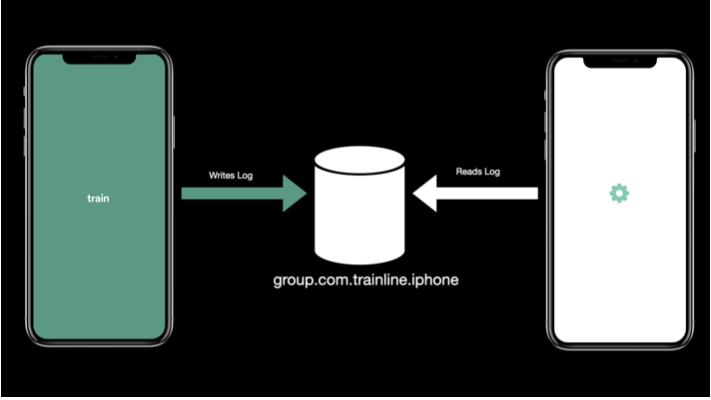
Trainline and Configurator share an app group (https://developer.apple.com/documentation/bundleresources/entitlements/com_apple_security_application-groups), so both apps can read the same logs.
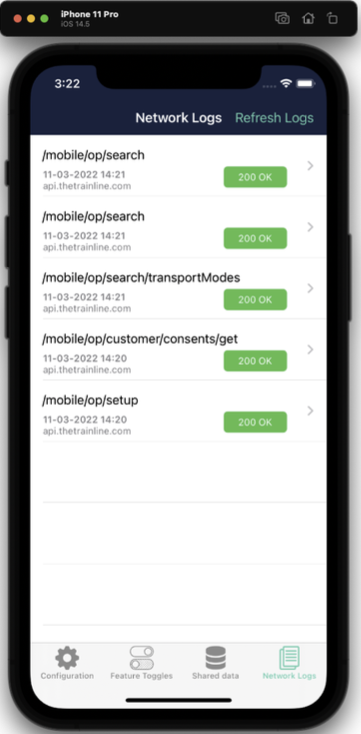
Here is the log list in Configurator:
And the detail view:
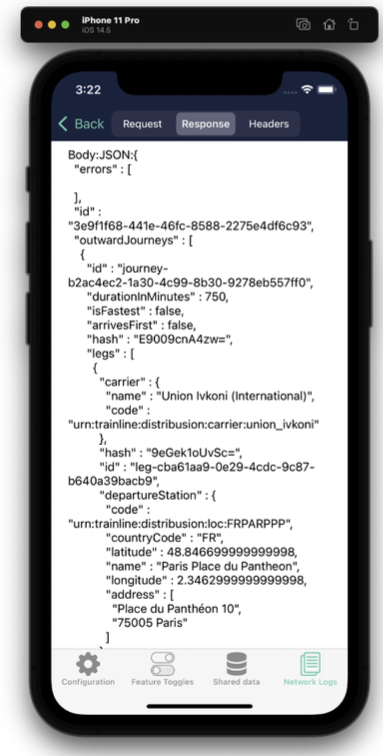
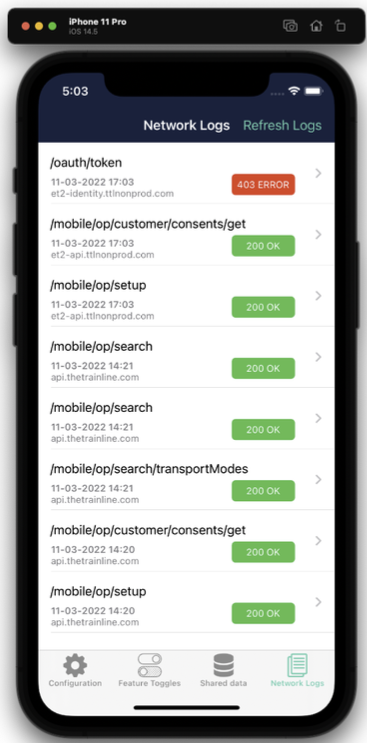
We plan to improve the detail view and add search. Even now, it is hugely useful. The example below shows a 403 error that we could inspect directly without a debugger. This is especially helpful on physical devices, which are harder to proxy than simulators.
Feedback
Since release, the network logger has made weekly testing far easier. It has also helped us catch production bugs, like a failed request caused by backend phone number validation that had been silently failing.
When integrating new endpoints, having logs on-device saves a lot of time. The feature is used regularly, and we have a steady stream of improvement requests.
If you are interested in similar debugging approaches, check out my post on how I build and deploy this website which also covers useful development workflows.